DidiScore
Coming soon to the App Store · iPad & iPhone

Your music.Readyfor stage.

DidiScore is a sheet-music app built around the gig, not the file. Import your PDF scores, build tonight's setlist, check that everything is ready, perform with a tap or a pedal, and finish the show even if something goes wrong.

01 Import · how it works

Not a file manager.
A concert.

Most score apps are built around the PDF. DidiScore is built around the gig: one loop from importing music to the final bow. Your originals are never modified.

  1. 01ImportBring PDFs in from Files. Every score is imported once, into one library.
  2. 02Create a gigDate, venue, sets and timed breaks.
  3. 03PrepareRead, mark with Apple Pencil, crop and split pages.
  4. 04PreflightOne check tells you if you're ready for stage.
  5. 05PerformTap or pedal. Change plans live. Recover from anything.
02 Build the gig

Tonight, on one screen.

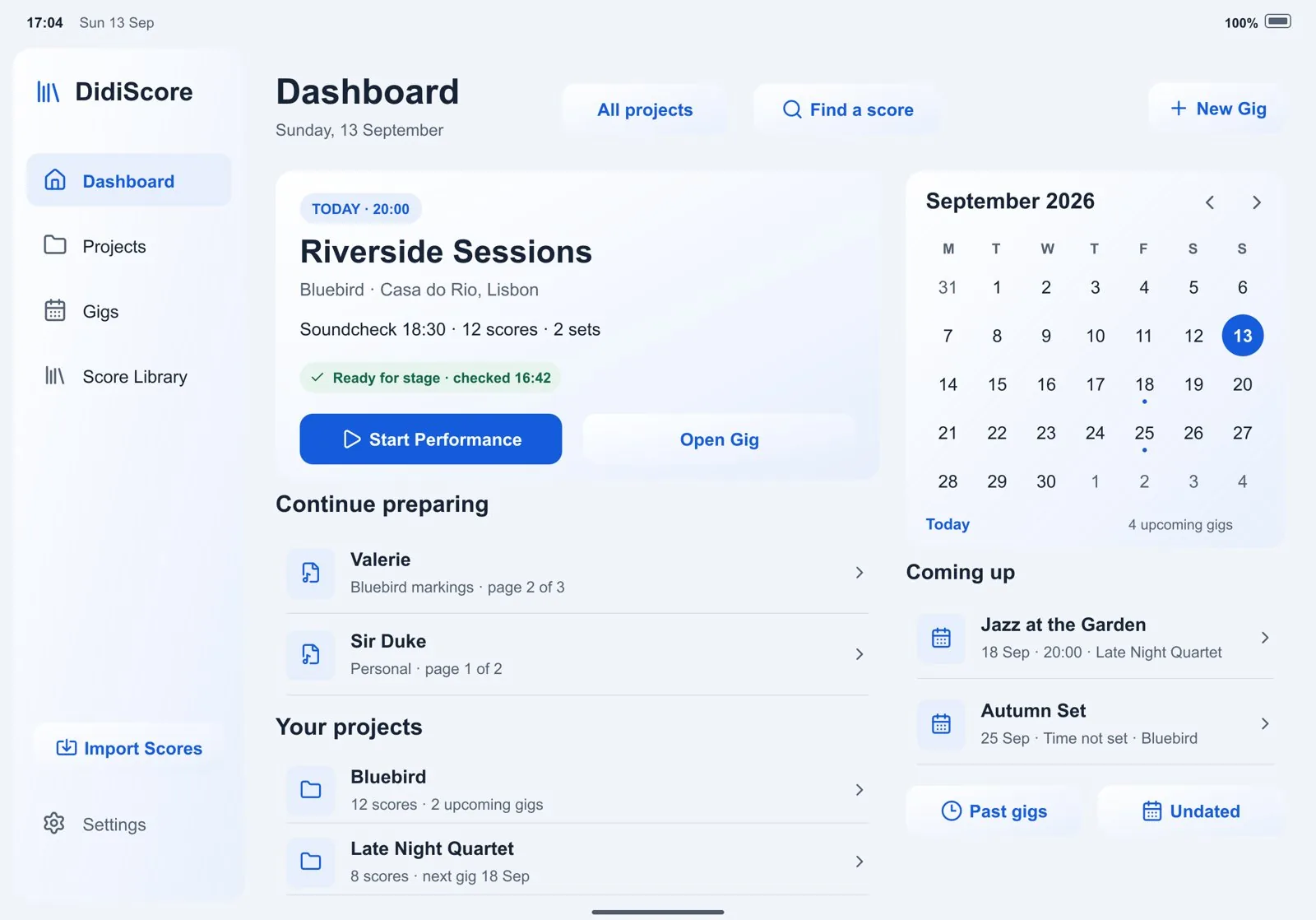
The dashboard shows what's next: tonight's gig, whether it's ready for stage, and the scores you were still preparing.

  • Setlists with sets and breaks. Drag songs across sets, time your breaks, add the gig to your calendar.
  • Projects for every band. Each band gets its own repertoire, markings and gigs, without duplicating a single file.
  • Speech notes. What to say before the song, the cue to watch, the count-in, shown full-size between songs.
The DidiScore dashboard on iPad: tonight's gig Riverside Sessions marked ready for stage, a Start Performance button, a September calendar and scores to continue preparing.
Riverside Sessions, ready for stage. The screen you see before you leave the house.
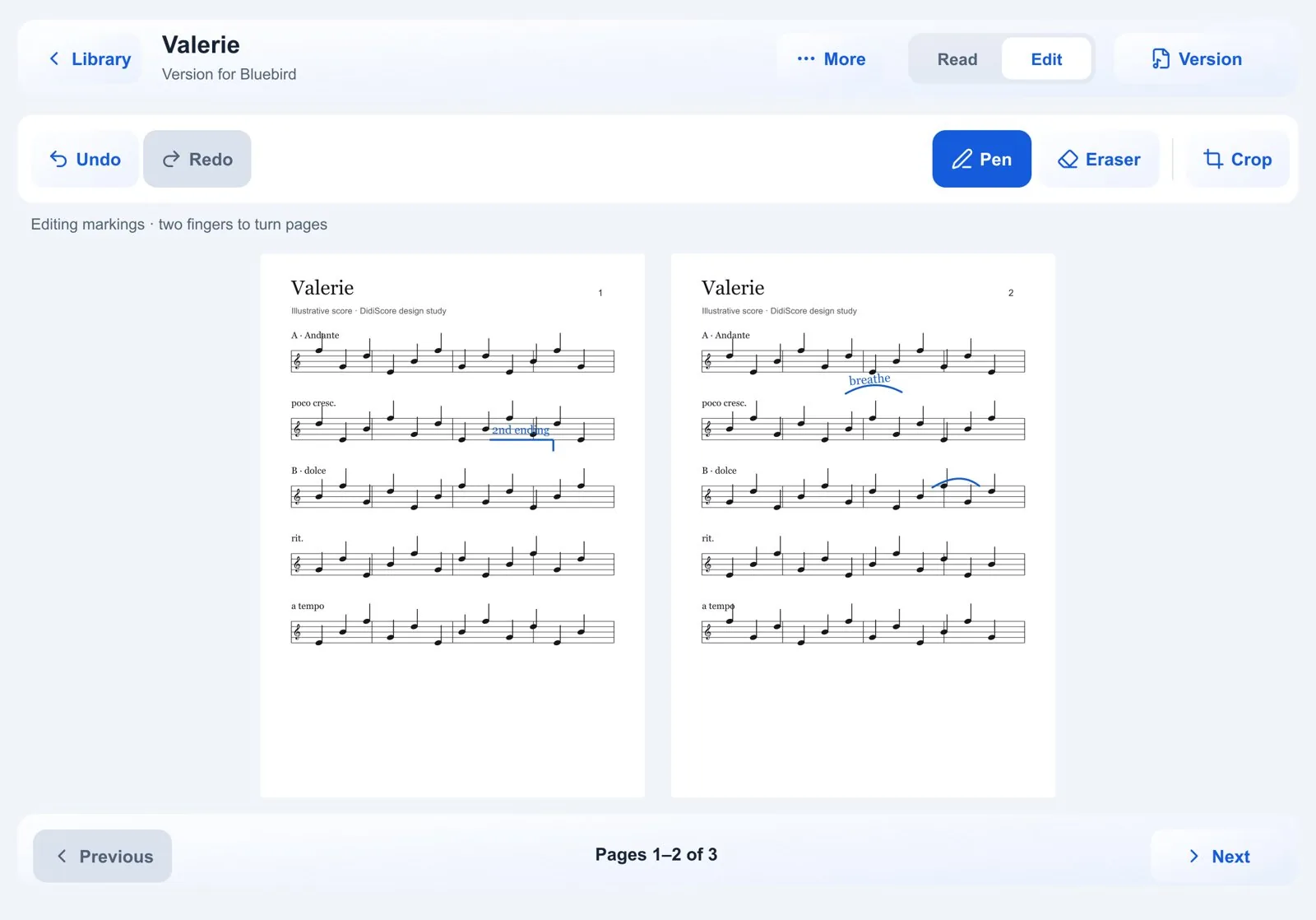
Editing markings on the song Valerie: Read and Edit mode switch, Pen, Eraser and Crop tools, and a two-page spread with blue handwritten marks.
Valerie, Edit mode. The blue marks are hers.
03 Mark it up

Your markings.
For every band.

Play the same song with three bands? Keep one copy of the PDF and a separate set of markings for each.

  • Read and Edit modes. Nothing gets drawn by accident while you read.
  • A notehead highlighter thin enough to mark one note without covering its neighbours.
  • Change history. See every edit with its time, jump to its page, roll back.
  • Crop, rotate and split pages, always reversibly.
  • Landscape shows a two-page spread; portrait a single page. Automatically.
04 Preflight

Know you're ready before you walk on.

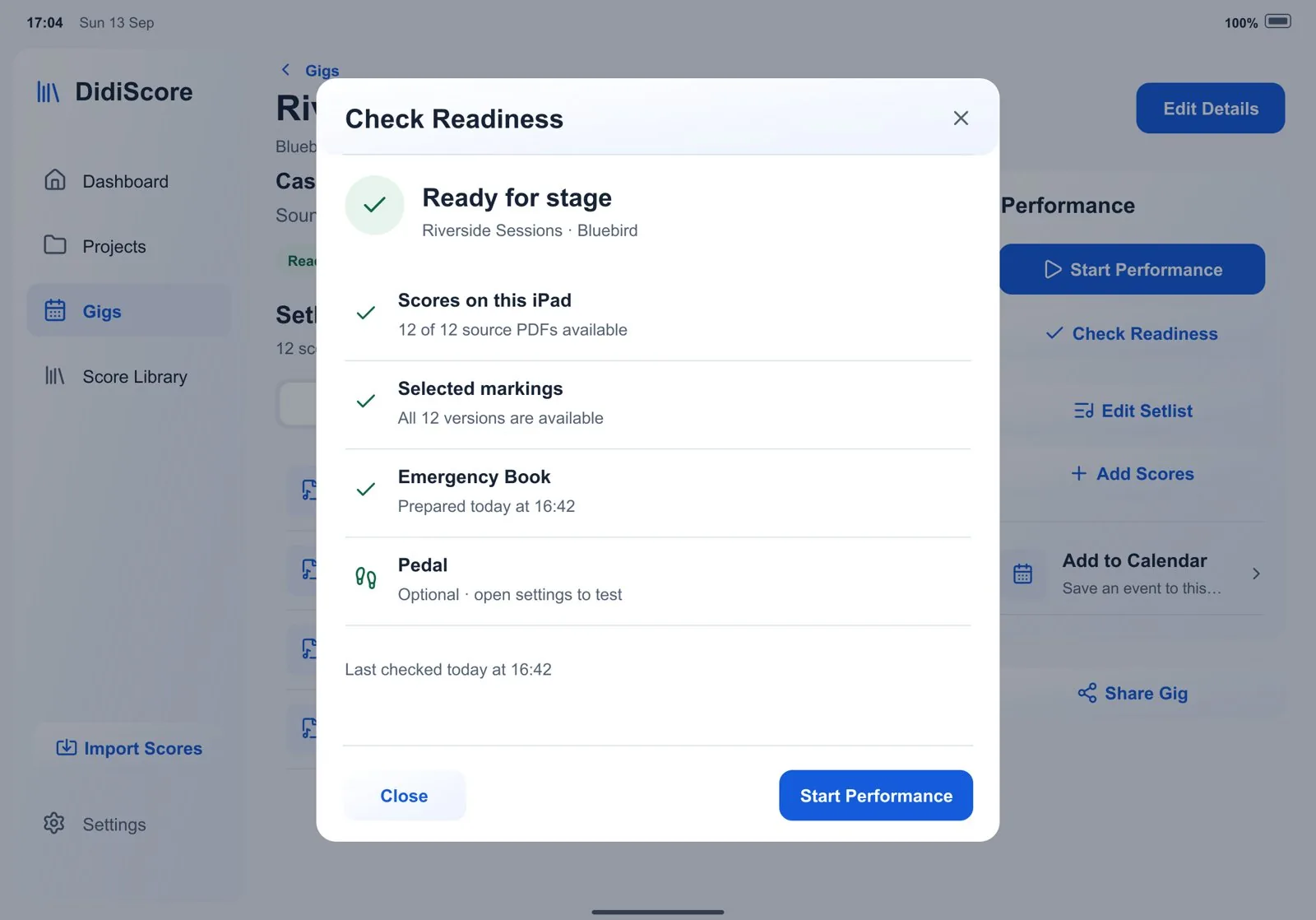
One check confirms that every score is on this iPad, every band's markings are in place, your backup copy is built and your pedal responds.

READYREADY WITH WARNINGSNOT READY

Every issue tells you what it means and how to fix it. And Preflight never stands between you and the stage: Start Performance is always available.

Check Readiness sheet: ready for stage, with ticks for scores on this iPad, selected markings, the Emergency Book and an optional pedal check.
Check Readiness: scores, markings, Emergency Book, pedal.
Break 15 min · then Set 2

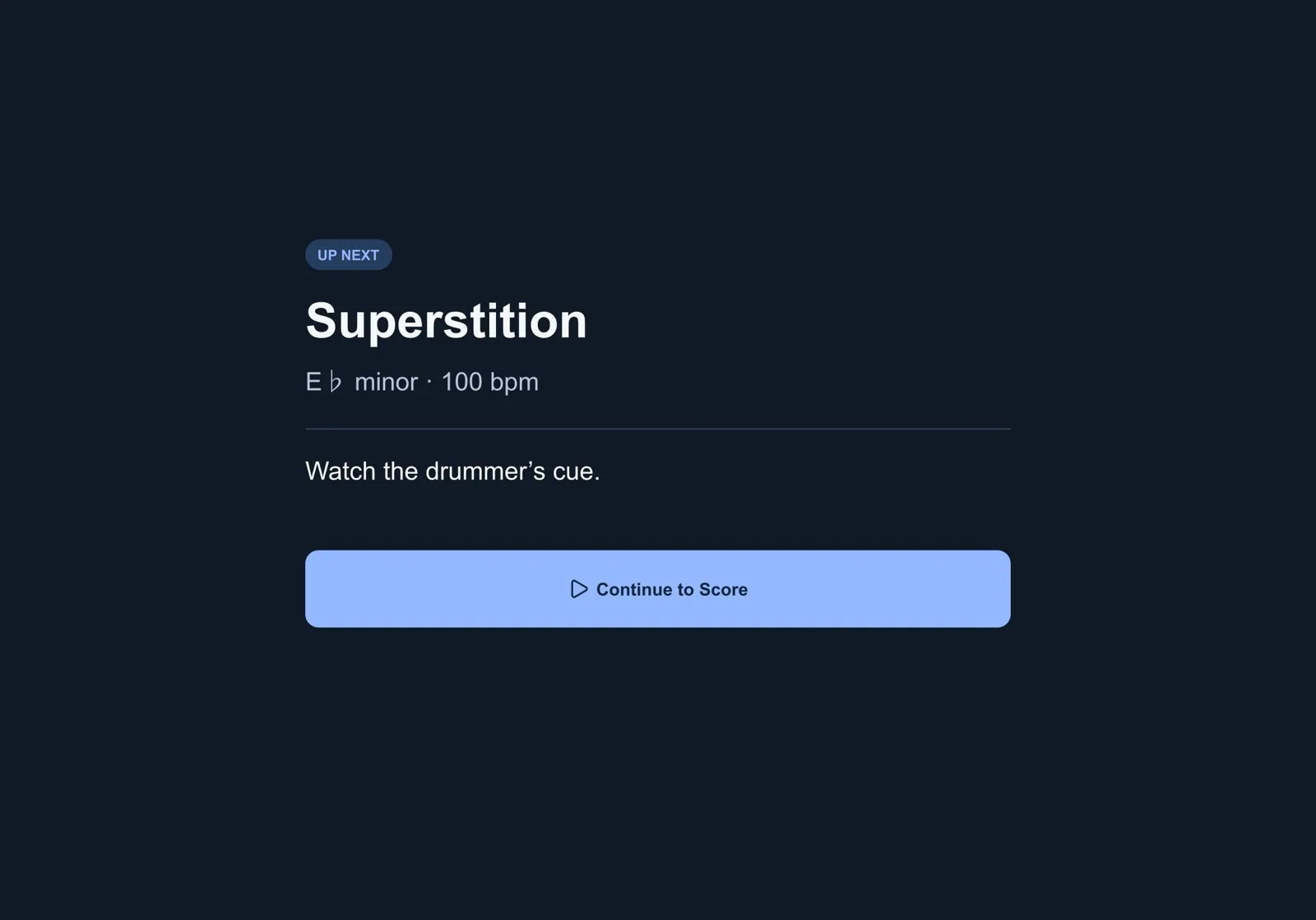
Up next: Superstition

E♭ minor100 bpmSong 4 of 12

Note to self: watch the drummer's cue.

05 Perform · Set 2

On stage, the score is everything.

Performance Mode hides the app and shows the music. Everything else is one tap, one pedal press, or out of the way. Try it: tap the right half of the iPad for the next screen, the left half for the previous one, or step on the pedal.

The DidiScore dashboard on an iPad Pro: tonight's gig Riverside Sessions marked ready for stage, a Start Performance button, a September calendar and scores to continue preparing.
Riverside Sessions · Dashboard · ready for stage Next: Start Performance tap left · previous  |  tap right · next  |  or step on the pedal below

A Bluetooth pedal maps in Settings with one press: next or previous page, next or previous song, or the queue. With the stage focused, your arrow keys work too.

Page turns

Turn pages your way

Tap right for next, left for previous, centre for controls, or use your pedal. Stage controls are large enough to hit mid-song, at arm's length.

Song to song

Like a concert folder

On the last page, next simply opens the next song. No dialogs, no “are you sure?”. An optional card shows key, tempo, starting pitch and your note.

Targets

Instant, by design

A page turn never touches the database or the library. Every position is saved immediately, in the background, with every turn.

06 Live Queue · Plan B

When the band changes plan.

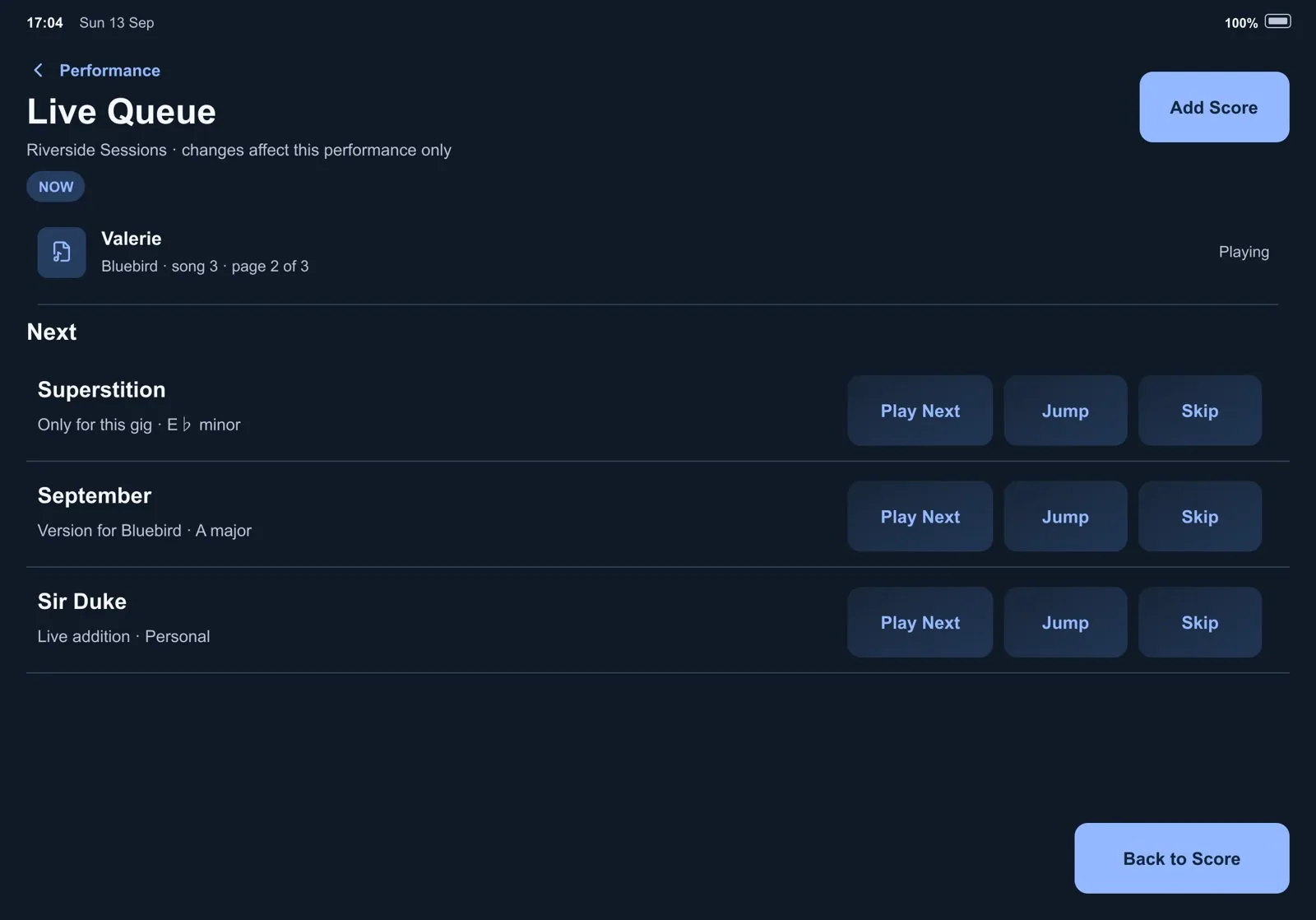
The Live Queue lets you skip, play next, jump, reorder or restore songs. Changes affect tonight only. Your planned setlist stays intact.

Live Queue: Valerie playing now, then Superstition, September and Sir Duke with Play Next, Jump and Skip buttons in a fixed column.
The Live Queue: buttons never move between rows, so you can hit them without reading.
Between-song card: Up next, Superstition, E flat minor, 100 bpm, note: Watch the drummer's cue, and a Continue to Score button.
Between songs: what's next, in what key, and what to remember.
07 When it goes wrong · Plan C

The show goes on.

Reliability isn't a feature of DidiScore. It is the product. The failure paths were designed as carefully as the happy path, around one question: can I finish the concert even if something has gone badly wrong?

No network

Works fully offline

A page turn never depends on the internet, iCloud, a login or a server. No account required, ever.

App closed mid-set

Resume the gig

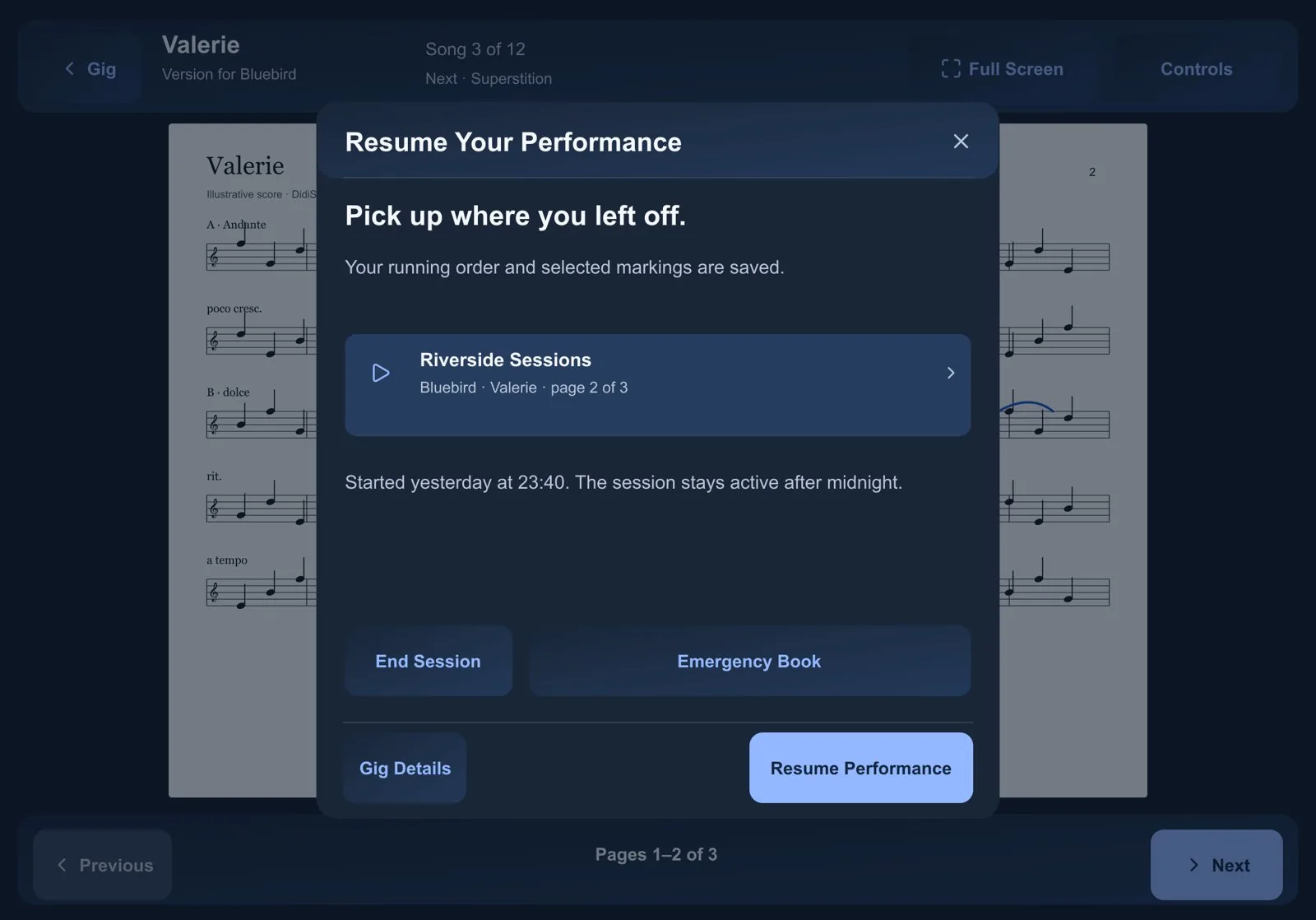
Your place is saved with every page turn. If the app is closed mid-set, it reopens on the same song, same page, same running order.

Everything else

Emergency Book

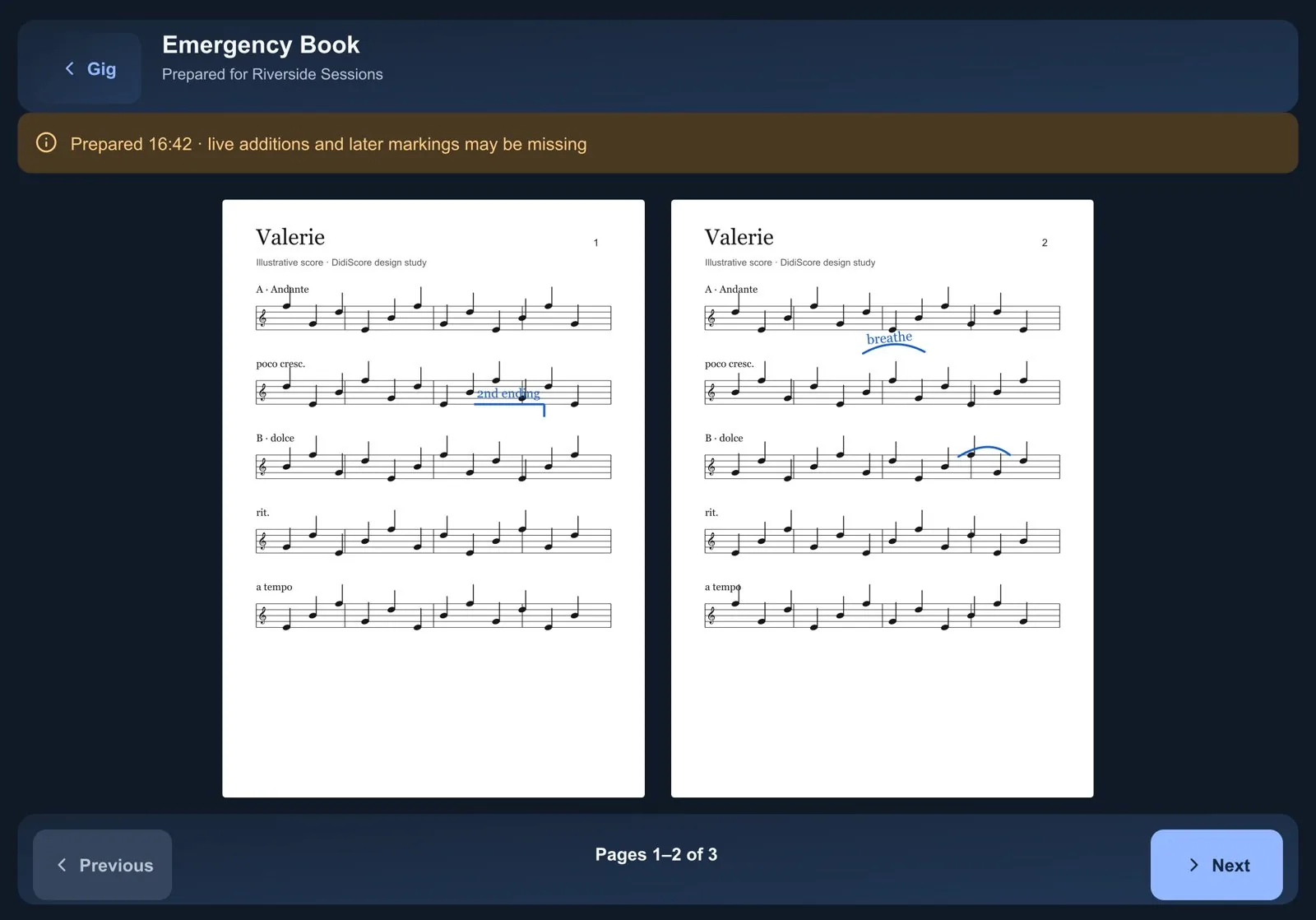
Before the show, DidiScore builds the whole gig as one flattened PDF, markings included. Emergency Mode opens it with just next and previous.

Resume Your Performance sheet: pick up where you left off, Riverside Sessions, Valerie, page 2 of 3, with Resume Performance and Emergency Book buttons.
Pick up exactly where you left off.
The Emergency Book: the gig's scores as one simple PDF with markings and large Previous and Next buttons.
The Emergency Book: just enough to finish the concert.
<100 ms
target for a page turn, perceived as instant
<300 ms
target to move from one song to the next
0
changes to your original PDFs, ever
0
accounts or cloud setup needed to play
5 × 2
colour themes, each in light and dark. The music always stays on white paper.
20
interface languages, including right-to-left layouts
08 Encore · Liner notes

It started at home,
the night before a show.

DidiScore wasn't planned in a boardroom. It was built for one singer, by the person who sits next to her at the kitchen table.

My wife, the singer and songwriter Didimpress, is a professional musician. In a typical month she sings with several different bands: different repertoire, different keys, different arrangements and a different running order every night. Her entire book of music lives on an iPad.

For years that iPad ran the industry's leading score app. It is capable and feature-rich, and she was still not happy with it. It is built around the document, while her working life is built around the gig: tonight's setlist, this band's markings, the pedal under her foot, and the certainty that the next page will be there when she needs it.

The friction showed up in the same places every time. The same song needed different markings for different bands. Building tonight's running order was a chore. Nothing told her, before she walked on stage, whether everything was actually ready. And if the app misbehaved in the middle of a set, there was no plan B.

I design products for a living. I spend my days watching people fight with software and turning that into better tools. Watching the person I love fight with it late at night, before a show, was different. So I sat next to her, listened, took notes, and built her the app she actually needed. I named it after her. She became its first user, its sharpest critic and its most honest tester.

Vocals, first user, toughest tester
Didimpress
Product, design, spec, build direction
Denis Zastanceanu
Recorded at
The kitchen table, Bad Kreuznach, Germany
Sessions
6 – 25 September 2026, twelve build phases
Instruments
Swift 6, SwiftUI, PDFKit, PencilKit, SwiftData. Native by conviction, no cross-platform layers.
Engineered with
AI agents writing code against a 1,600-line spec, under written rules, verified on the running app
Takes
237 commits · 462 automated tests · 457 designed screen states · 19 verification reports
Test score
“Valerie”, straight from her book. The Soundexpress gig in the designs is a real one.
Session notes what she said or did · what changed
  1. “Thinner. As thick as a note, but semi-transparent.”Custom notehead, thin and wide highlighter presets at 30–40% opacity.
  2. “The eraser. Usually it erases. What is this?”Reproduced in an automated test, root-caused and fixed, with regression tests.
  3. Black ink appeared white on the dark stage.Ink always renders as ink on white paper, on stage and in the Emergency Book.
  4. “There should be two modes. Read mode and editing mode.”Named Read and Edit modes, Read by default, no accidental ink.
  5. “Maybe some kind of history…” with greyed-out undone steps.Change history with rollback and jump-to-page.
  6. “Controls, Hide. I didn't understand what Hide is. Maybe a cross?”The full-screen panel was rebuilt with a familiar close ×.
  7. “Leave for Now” read as closing the whole gig.Pause Performance and Finish Gig, each with a one-line explanation.
  8. A hard stop at the end of a song felt wrong.I reversed my own earlier decision: next page opens the next song.
Featured artist the voice behind the name
Didimpress
Pop · Soul · R&B · Jazz · Rock · Gospel · Big band

“I don't just want to sing. I want to touch people.”

Professional singer and songwriter from Bad Kreuznach, Germany. She sings with the Soundexpress Bigband, performs as a soloist with gospel choirs in Wiesbaden and Mainz, and plays weddings, corporate events and private celebrations, solo, as a duo, with a three-piece band or a five-piece party band. She also writes and releases her own music. A big band on Friday, a gospel choir on Sunday, a wedding in between: that is exactly the life DidiScore is built for.

  • KurhausStama-Ball, Bad Kreuznach, with the Soundexpress Bigband
  • Spa gardensJazz Matinee, Bad Kreuznach
  • MainzSoloist with New Spirit Gospel Choir and Downtown Bigband
  • RingkircheChristmas concert with the gospel choir XANG, Wiesbaden
Singles written and released by Didimpress
  1. A1Let People See
  2. A2What If Today Is My Very Last Day
  3. B1Lovely One
  4. B2The Reason We Fight
The maker Denis Zastanceanu

Product designer. AI-native DesignOps.

DidiScore began as a gift to someone I love. It became the clearest demonstration of how I work: research that becomes structure, opinionated product judgement, a real design system, engineering fluency and AI agents inside a disciplined spec → plan → build → verify loop. Real testing reversed some of my own decisions. I documented why, and the product got better.

“I built DidiScore so my wife could walk on stage with one less thing to worry about.”

Rules written into the system
  • Never write to an imported PDF.
  • A page turn never queries the database.
  • Every page position is saved immediately, off the main thread.
  • The Emergency Book is built in the background, never during a page turn.
  • Preflight informs; it never blocks Start Performance.
  • Stage changes edit tonight's order, never the planned setlist.
  • Unreadable ink is preserved, never silently dropped.
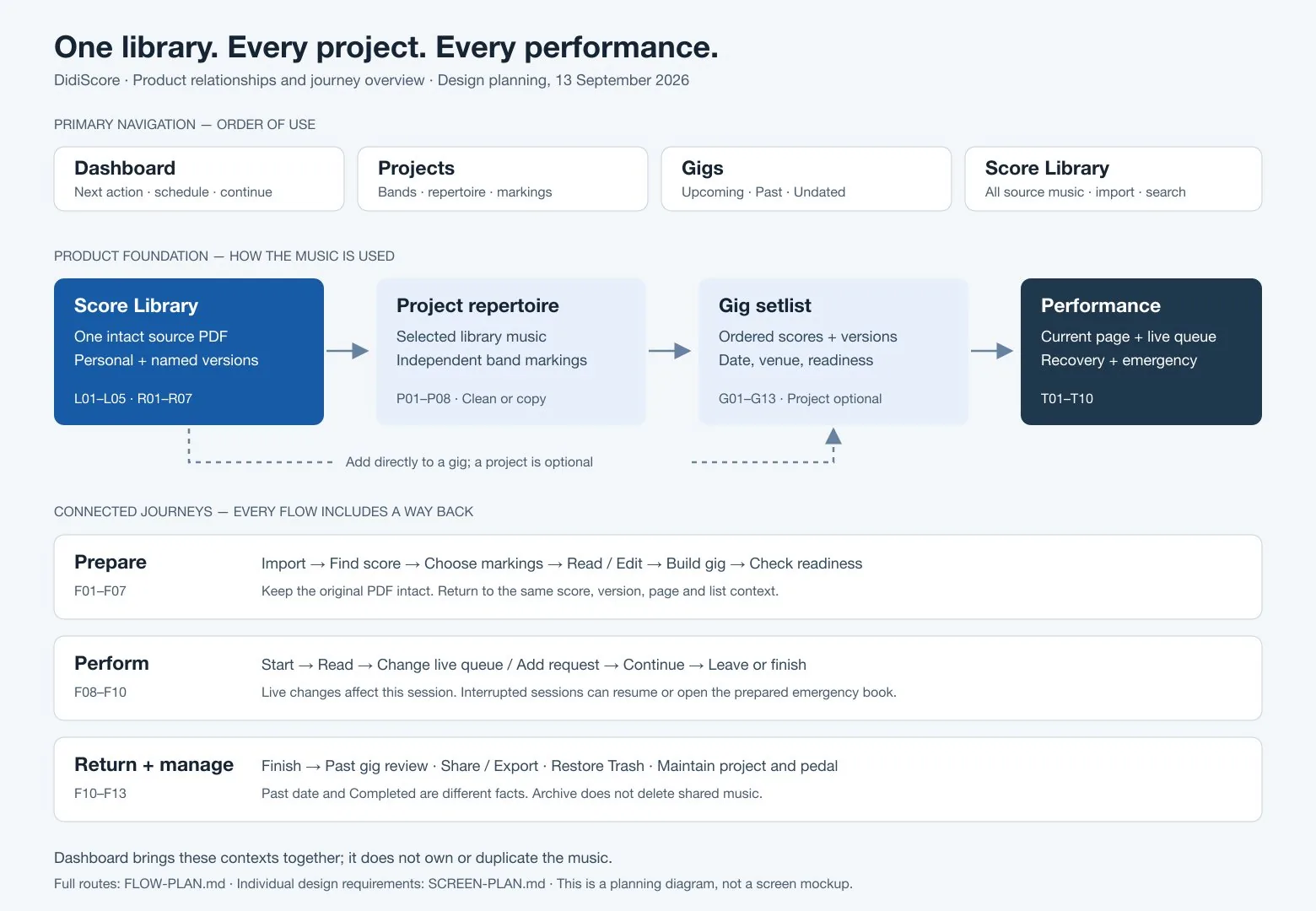
Flow overview: primary navigation, the product foundation from Score Library to Performance, and every connected journey.
One library, every project, every performance. Each journey with a way back.
09 Encore · App Store

Coming soon.

DidiScore is in testing with working musicians and is coming to the App Store for iPad and iPhone. Want to know the day it lands, or try it with your band before then? Write to Denis.

denis.zastanceanu@gmail.com